
This guide walks you through how to run ChatGPT Ads from a blank account to a live campaign, step by step. It’s written for business owners, marketers and small marketing teams who haven’t set up a ChatGPT Ads campaign before and want a clear walkthrough rather than a general overview of what ChatGPT Ads are. Have Ads Manager open in another tab if you can — you should be able to follow along and build your first campaign as you read.
Step 1: Set Up Your ChatGPT Ads Account
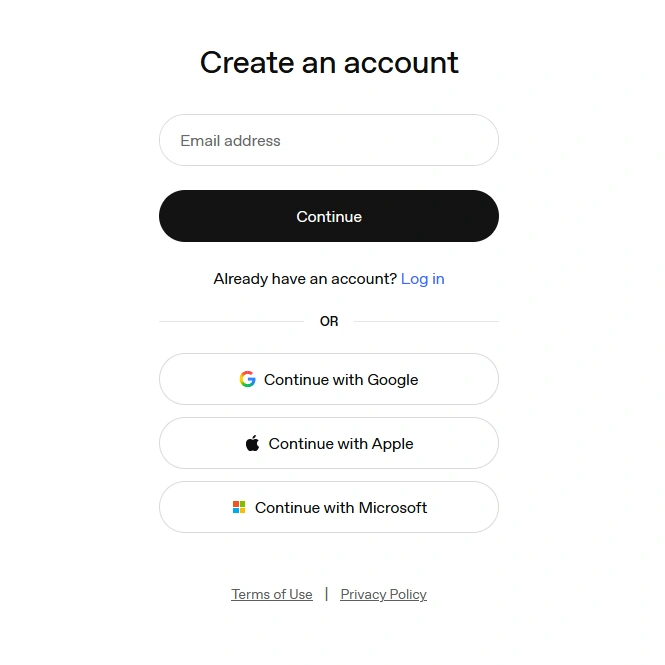
Before you can build a campaign, you need a working advertiser account. You can start this two ways: go straight to Ads Manager at ads.openai.com, or begin inside ChatGPT itself via ChatGPT Ads Manager and finish the rest on the website.
Here’s what setting up the account actually involves:
- Sign in with an existing OpenAI account tied to your work email, or create a new one.
- Enter your business details — business name, website, logo and industry — plus account details including country, currency, time zone and address.
- Complete identity verification. OpenAI runs this through a third-party verification step as part of onboarding.
- Once you get the platform access email, go to Settings > Account Info and confirm your account name and logo display. Ads genuinely won’t serve until this is done.
- Set up billing: create a billing profile with your business name, invoice email and billing address, then add a payment card.
- If anyone else needs access, invite them under Settings > Users > Invite.
Your account is ready to build a campaign once verification has cleared, your account info is confirmed, and billing is fully set up. If any of those three are incomplete, campaigns can be built but won’t actually serve.
Step 2: Prepare Before You Create Your First Campaign
With the account ready, don’t jump straight into the campaign builder. Have these ready first — it’ll make the actual setup much faster:
- A specific website or landing page to send traffic to (not just your homepage — more on this in Step 8).
- A campaign objective in mind: are you paying for views, clicks, or optimising toward a conversion event?
- A rough sense of your target market and budget.
- Ad creative: at least one headline, one description and one image.
- A clear idea of the specific product or service you’re promoting — not “the whole business.”
Campaigns in Ads Manager are built in three layers: the campaign (objective, budget, dates, country targeting), the ad group (where you add context hints), and the ad itself (headline, description, image, landing page). Knowing that structure before you start makes the next few steps much easier to follow.
Step 3: Decide What You Want to Advertise
Pick one clear offer, not your entire business. A single campaign works best when it’s built around one specific thing someone can say yes to. A few examples:
- University or college → a specific programme, intake, or campus visit, rather than promoting the institution as a whole.
- SaaS company → a free trial or demo booking, not the whole product suite.
- eCommerce business → one product category or bestseller range, not the full catalogue.
- Professional services firm → a consultation or enquiry for one practice area.
The reason this matters: your offer needs to match a specific type of conversation someone might be having in ChatGPT. “University in Malaysia” is broad enough that it could apply to many different conversations. “Study a business degree in Malaysia” or “Book a campus tour for an international school” gives the campaign a much clearer context to work around.
Step 4: Set Up Your Context Hints
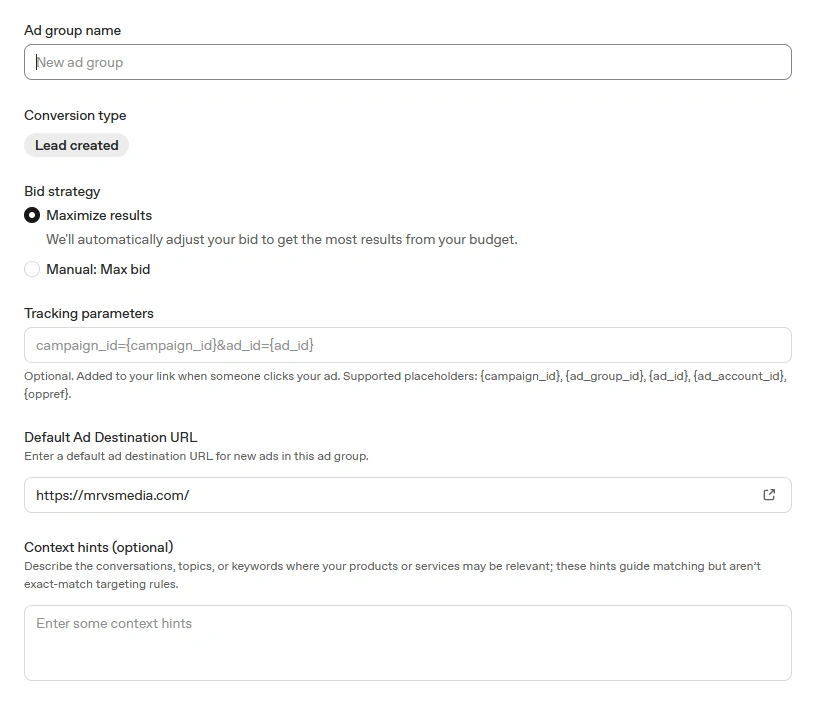
This is the part that trips up most people coming from Google Ads, so it’s worth slowing down for.
What Context Hints Actually Are
Context hints are short, written descriptions you add at the ad group level to help ChatGPT understand when your business might be relevant to a conversation. They are not exact-match keywords, and OpenAI is explicit about this: hints don’t guarantee your ad will appear for particular conversations, audiences or situations. They inform relevance — they don’t control delivery the way a keyword list does in Google Ads.
That means a list of disconnected keywords (“digital marketing agency, SEO, Google Ads, advertising Malaysia”) isn’t a good context hint. A natural sentence describing your business and who it helps is.
What to Include
A strong context hint covers three things:
- What your business does — be specific about the actual service or product, not a generic category.
- Who it’s relevant for — the situations, needs or intent where you’re a genuine fit.
- What to steer away from — the adjacent topics your business gets confused with, even though this works differently to a true exclusion (more on that below).
Here’s what that looks like for a digital marketing agency:
MRVS is an integrated digital marketing agency providing paid ads, SEO, websites, analytics, CRM and automation.
Show the ads when businesses are looking for a digital marketing agency, Google Ads agency, SEO agency, lead generation partner, or help improving marketing performance.
Avoid educational, employment, academic and DIY intent such as digital marketing courses, jobs, internships, tutorials, or users looking to run campaigns themselves.
A Note on Exclusions
Worth being precise here, because this is a common point of confusion: as it stands, advertisers can’t add their own negative or excluded context the way you’d add negative keywords in Google Ads — context hints are a positive-only field. OpenAI has reportedly been testing a separate negative-targeting option with a small group of advertisers, but it isn’t generally available at the time of writing. Until it is, the practical way to “exclude” the wrong intent is to be specific and precise in your positive hints, the way the example above steers toward commercial intent without ever writing a negative rule.
Common Context Hint Mistakes
- Writing a list of keywords instead of a natural description.
- Making the hint so broad it could describe half the industry.
- Including informational intent with no buying signal behind it.
- Keyword-stuffing the same terms repeatedly, hoping it improves matching.
- Never actually describing what the business does, and assuming the ad copy alone will cover it.
Step 5: Choose Your Location and Market Targeting
Country targeting is required at the campaign level — you can’t launch without selecting at least one. For campaigns that aren’t using a product feed, you can also narrow targeting to states, cities or postal codes within that country, and there’s an optional platform setting (Android app, Android web, desktop web, iOS app, iOS web) if you want to separate performance by device.
If your business genuinely serves more than one country, it’s usually worth building separate campaigns per market rather than combining them into one. That’s not a platform requirement — it’s a measurement one: a single blended campaign across markets makes it much harder to tell whether performance is actually good, or being carried by one country and masked by a weak one.
Step 6: Write Your Ad Headline and Description
Your ad copy needs to do three things quickly: say what you offer, say why it’s relevant to the conversation, and say what the reader gets out of it. There’s no room for a clever line that makes someone guess what you actually do.
A simple example for a digital marketing agency:
Headline: Digital Marketing That Drives Growth
Description: One partner for digital growth. Integrated marketing built to generate better leads and sales.
On character limits: OpenAI hasn’t published a fixed numeric limit for titles and descriptions in its help documentation — the guidance is simply to keep both concise. Ads Manager shows a live character counter as you type, so write to that counter rather than a number you’ve seen quoted elsewhere, since this is exactly the kind of detail that can change as the platform develops. As a general rule, short and direct reads better than a full sentence crammed in.
Build a few variations of each rather than relying on one headline and one description — giving the system more combinations to work with tends to help coverage.
Step 7: Create Your Ad Image
Ads in ChatGPT show up as a fairly compact card inside a conversation, so the image needs to work small. A few principles:
- Keep the composition simple — one clear focal point, not several competing elements.
- Make the brand identity obvious at a glance, even at a small size.
- Use minimal text on the image itself — the headline and description already carry the message.
- Avoid crowding the frame with multiple products, logos or messages at once.
- Preview it small before you upload. If it’s hard to read at thumbnail size, it needs simplifying.
OpenAI’s own creative guidance is qualitative rather than a published spec sheet — images should be simple, relevant and aligned with the title and copy, without a fixed numeric dimension requirement stated in its help documentation. Use whatever upload requirements the interface shows you at the point of uploading as the source of truth, rather than a number quoted on a third-party blog.
For a digital marketing agency, a clean branded visual showing different marketing channels working together toward business growth, paired with a simple line like “One Partner for Digital Growth,” is the kind of direction that tends to work — a clear idea, not a cluttered collage.
Step 8: Choose Your Landing Page
Send the click somewhere that matches the conversation, not your homepage by default. A few examples:
- SEO-related context hints → your SEO service page.
- Google Ads intent → your paid advertising page.
- Broad “digital marketing agency” intent → your main agency or services page.
A generic homepage forces the visitor to do the work of finding the thing they were just reading about, and that gap is where a lot of clicks quietly disappear. The page itself should have a clear proposition, a strong call to action, a fast mobile experience, an easy way to enquire or fill in a form, and some basic trust signals — reviews, client logos, or credentials, depending on what’s genuinely relevant to your business.
One technical detail worth checking with whoever manages your website: your landing page needs to be reachable by OpenAI’s crawlers, OAI-AdsBot and OAI-SearchBot. If your site blocks unrecognised bots by default, this is worth confirming before launch rather than after.
Step 9: Review and Launch the Campaign
Before you submit, run through this quickly:
- The landing page URL is correct and includes UTM parameters for tracking.
- Location targeting matches where you can actually serve customers.
- Context hints describe genuine commercial intent, not just your industry in general.
- Ad copy matches the specific offer, not the whole business.
- The image displays clearly at a small size.
- Conversion tracking is set up and working, if you’re using the Conversions objective.
Campaigns go through a review process once submitted before they start serving, so don’t expect traffic the instant you hit launch. If a campaign shows a “not serving” status after review, check back in Ads Manager for the reason rather than assuming it’s simply slow to start.
Step 10: Measure ChatGPT Ads Performance
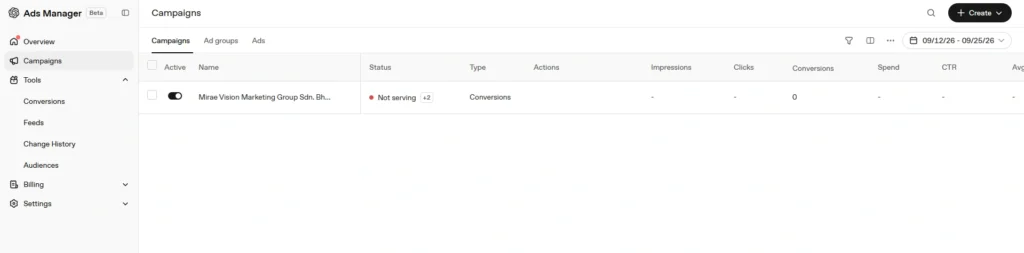
Once live, Ads Manager reports on impressions, clicks, click-through rate, average CPC, average CPM, spend and conversions where tracking is set up. Most metrics refresh roughly every 15 minutes; spend specifically can lag by 7–8 hours, so don’t panic if today’s spend figure looks low partway through the day.
Clicks and impressions alone don’t tell you whether a campaign is working — they tell you it’s running. For a lead generation business specifically, the number that actually matters is qualified leads and cost per qualified lead, not raw click volume. A campaign with a low cost per click and no real enquiries isn’t a good result; it’s an expensive way to find that out.
Step 11: Optimise the Campaign
A few things you can adjust directly in Ads Manager once you have a few days of data:
- Refine your context hints if performance suggests you’re being shown in the wrong kind of conversation.
- Test new headline and description variations rather than sticking with the first version.
- Test a different image if engagement is weak despite reasonable targeting.
- Split different services or audience intents into separate ad groups or campaigns, rather than one campaign trying to cover everything.
Beyond that, the more general marketing discipline applies just as it would on any platform: improve landing page relevance, tighten the offer, and keep checking that what you’re optimising for — clicks versus leads versus qualified leads — is actually the number that matters for the business, not just the easiest one to see on the dashboard.
ChatGPT Ads vs Google Search Ads
These aren’t competing for the same moment, and one isn’t a replacement for the other. Google Search Ads respond to an explicit search — someone typed a query and you’re bidding to answer it. ChatGPT Ads can appear within a relevant conversation, which might happen earlier in someone’s thinking, before they’ve settled on the exact words they’d type into a search bar.
| Google Search Ads | ChatGPT Ads | |
|---|---|---|
| Trigger | An explicit typed search query | Relevance to an ongoing conversation |
| Targeting unit | Exact and phrase-match keywords | Context hints (non-exact, relevance-based) |
| Typical moment | Often later, higher-intent stage | Can be earlier, exploratory stage |
| Control over exclusions | Negative keywords, well established | Positive-only hints; negative targeting still in limited testing |
In practice, the two can complement each other rather than compete for the same budget line — ChatGPT Ads reaching someone while they’re still exploring options, Search Ads catching them once they’ve decided what to type.
Common Mistakes When Running ChatGPT Ads
- Treating context hints exactly like Google Ads keywords — writing a keyword list instead of a natural description of the business.
- Targeting informational intent instead of genuine commercial or buying intent.
- Writing context hints so broad they could apply to half the industry.
- Skipping the “what to avoid” framing in your context hints, even though it isn’t a true exclusion yet.
- Sending every click to the homepage instead of a page that matches the conversation.
- Overloading the ad image with text that becomes unreadable at a small size.
- Optimising for clicks instead of lead quality, and calling a campaign successful before checking whether it actually produced real enquiries.
ChatGPT Ads is still a genuinely new advertising channel, so it’s worth approaching it as a structured test rather than a full budget commitment on day one. Start with one clear offer, one clear audience or intent, context hints that actually describe your business, proper conversion tracking, and a realistic test budget you’re comfortable evaluating honestly. If you’d rather have someone set it up and manage it alongside your existing Google Ads or Meta Ads campaigns, MRVS’s paid media team can do that as part of a connected advertising approach, rather than running it as a one-off experiment nobody reviews.